
Step One: Let's upload your files!
Drop in exports from whichever apps you used — WhatsApp, Instagram, Messenger, any mix — and we'll stitch them into one timeline, right here in your browser. Exported your whole Facebook inbox instead of just one chat? Drop in every zip it gave you — we'll do the parsing.
Your chat never leaves this device.
It's read right here in your browser — nothing is uploaded, and we never see your messages.
Exporting from WhatsApp
Takes about 10 seconds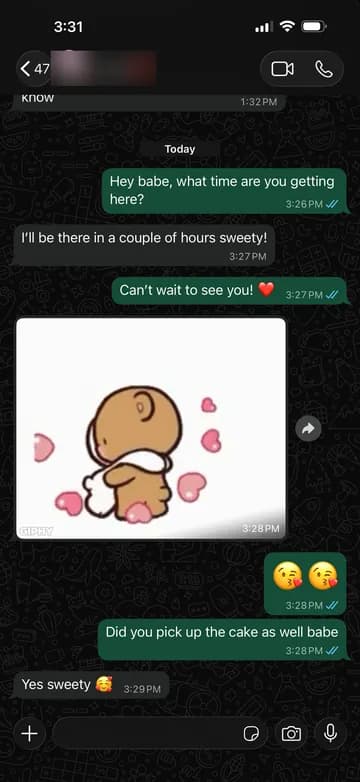
Open your chat with them.
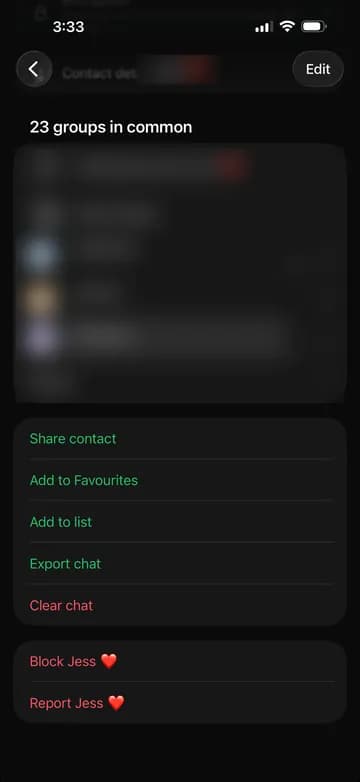
Tap their name at the top, scroll down, and tap "Export Chat".
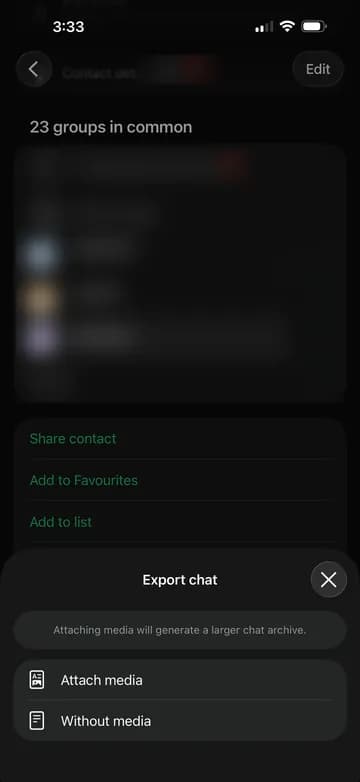
Choose "Without Media" — it's smaller and it's all we need.
Save it to Files, then drop it below.
Works straight from your phone — no waiting, nothing to request.
Exporting from WhatsApp
1Open your chat with them.
2Tap their name at the top, scroll down, and tap "Export Chat".
3Choose "Without Media" — it's smaller and it's all we need.
Save it to Files, then drop it below.
Works straight from your phone — no waiting, nothing to request.
Drop _chat.txt or the whole .zip here.
or click to browseDrop message_1.json or the whole .zip here.
or click to browseDrop message_1.json or the whole .zip here.
or click to browsewhat you've brought so far
0 of 3 apps added
One app is plenty to start — add more any time for a fuller picture.
Read in your browser — we never see your messages.
This file is not going anywhere.
Parsing and analysis happen entirely on your device. Only the aggregate stats you'll see next are ever saved — plus your opening line, so the Wrapped can quote it.
Read in your browser — we never see your messages.